How to Keep Message Order in Kafka Without Killing Scalability
Partition-level ordering, the multi-consumer trap, and two strategies that actually work.
February 26, 2025
Apache Kafka gives you partition-level ordering, not topic-level ordering. If you don't design for that up front, consumers will see messages in the order they landed inside each partition—not in the global order they were produced to the topic. The good news: you can keep the ordering guarantees you need and still get scalability, parallel processing, and load balancing. This article walks through the problem, the trade-offs, and two concrete strategies (with KafkaJS code) so you can maintain order where it matters.
The Problem: Why Your Messages Arrive Out of Order
The Setup You Probably Have
- ·Topic: One Kafka topic with multiple partitions (e.g. 10).
- ·Producer: Publishes messages to the topic.
- ·Consumer(s): Consume from the topic.
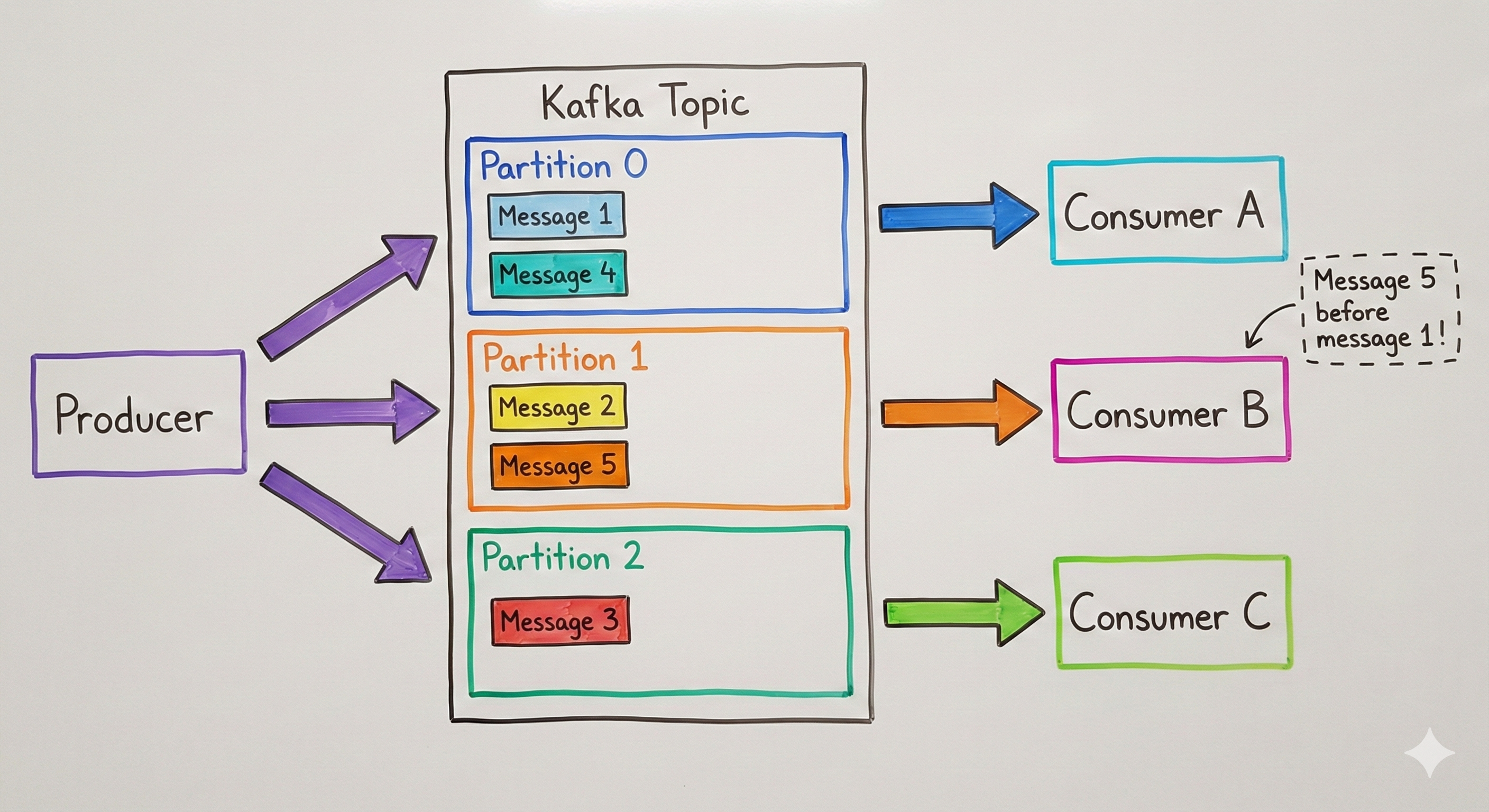
If the producer doesn't specify a partition or a consistent key, the broker (or client) picks a partition randomly or in round-robin. Two things follow: Order is preserved only inside each partition. Partition 0 has an order; Partition 1 has an order; across partitions there is no guaranteed order. Consumers see partition order, not topic order. The "sequence of data as produced to the topic" is lost, because each partition is read independently. So: ordering in Kafka is partition-local, not global to the topic.
Why Order Is Lost at the Consumer
| Aspect | What actually happens |
|---|---|
| Producer | Message 1 → partition 5, message 2 → partition 2, message 3 → partition 5. No global order. |
| Partition | Each partition is an ordered, append-only log. Order is strict within that partition only. |
| Consumer | Might read partition 2 first, then partition 5. So message 2 can be consumed before message 1 and 3. |
You get: Correct: Order of messages that landed in the same partition. Wrong (if you care about topic order): Order of messages across the entire topic. To get predictable ordering, you either use a single partition or control which partition each message goes to, so that order-critical messages share the same partition.
Single Consumer vs. Multiple Consumers
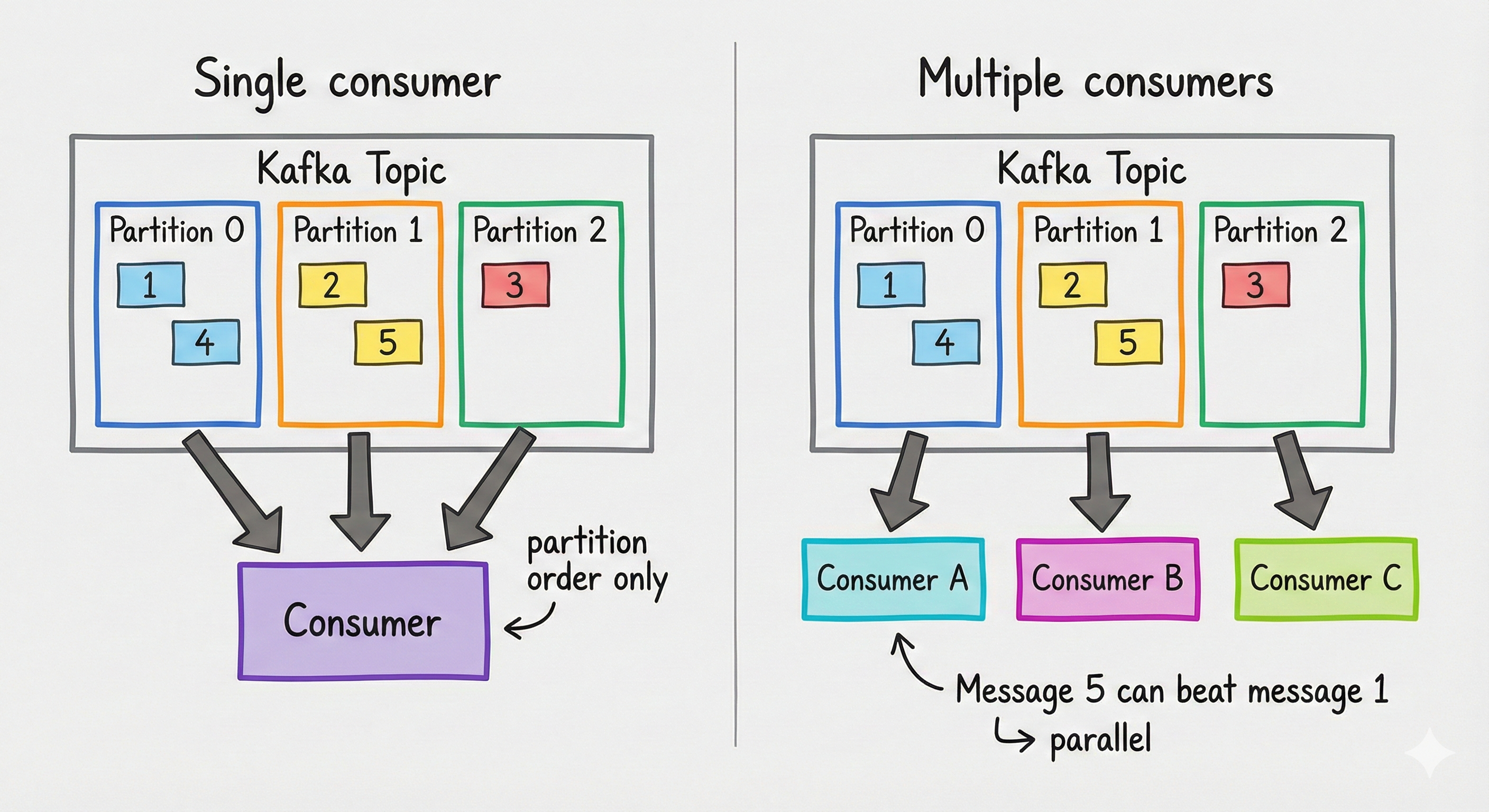
Single consumer per topic: That one consumer may read from all partitions, but it still sees partition order, not topic order. It might process partition 2, then partition 5—so message 2 can be handled before message 1 and 3. Ordering is still only within each partition.
Multiple consumers per topic: With several consumers in the same group, each consumer is assigned one or more partitions and consumes in parallel. Then message 5 can be consumed before message 1 in a very obvious way: Consumer A reads partition 0 (messages 1, 4, 7…), Consumer B reads partition 1 (2, 5, 8…), Consumer C reads partition 2 (3, 6, 9…). Because they run in parallel, Consumer B can finish message 5 before Consumer A has processed message 1. There is no guaranteed consumption order across the topic—only per partition. This is the typical scalable setup, and it's why order-dependent messages must go to the same partition if you want them consumed in sequence.
With multiple consumers, message 5 can be processed before message 1 because partitions are consumed in parallel. Order-critical messages must go to the same partition.
The Trade-off and the Goal
Option A: Single Partition
- ·Behavior: All messages go to one partition. One consumer (per consumer group) reads it. Order equals production order.
- ·Pros: Simple; no partition logic; full ordering.
- ·Cons: No parallelism, no load balancing, single throughput bottleneck—not scalable.
Option B: Multiple Partitions (What You Want)
- ·Behavior: Messages spread across partitions; multiple consumers read in parallel. Throughput and scalability go up.
- ·Pros: Scalability, parallel processing, load balancing.
- ·Cons: No topic-wide order unless you decide which messages go to which partition (e.g. by producer or by event type).
Ideal goal: Use multiple partitions for scale and parallelism, and preserve ordering only where it matters by routing related messages to the same partition (and thus to the same consumer, in order).
Two Strategies That Preserve Order and Scale
Strategy 1: Producer-per-Partition
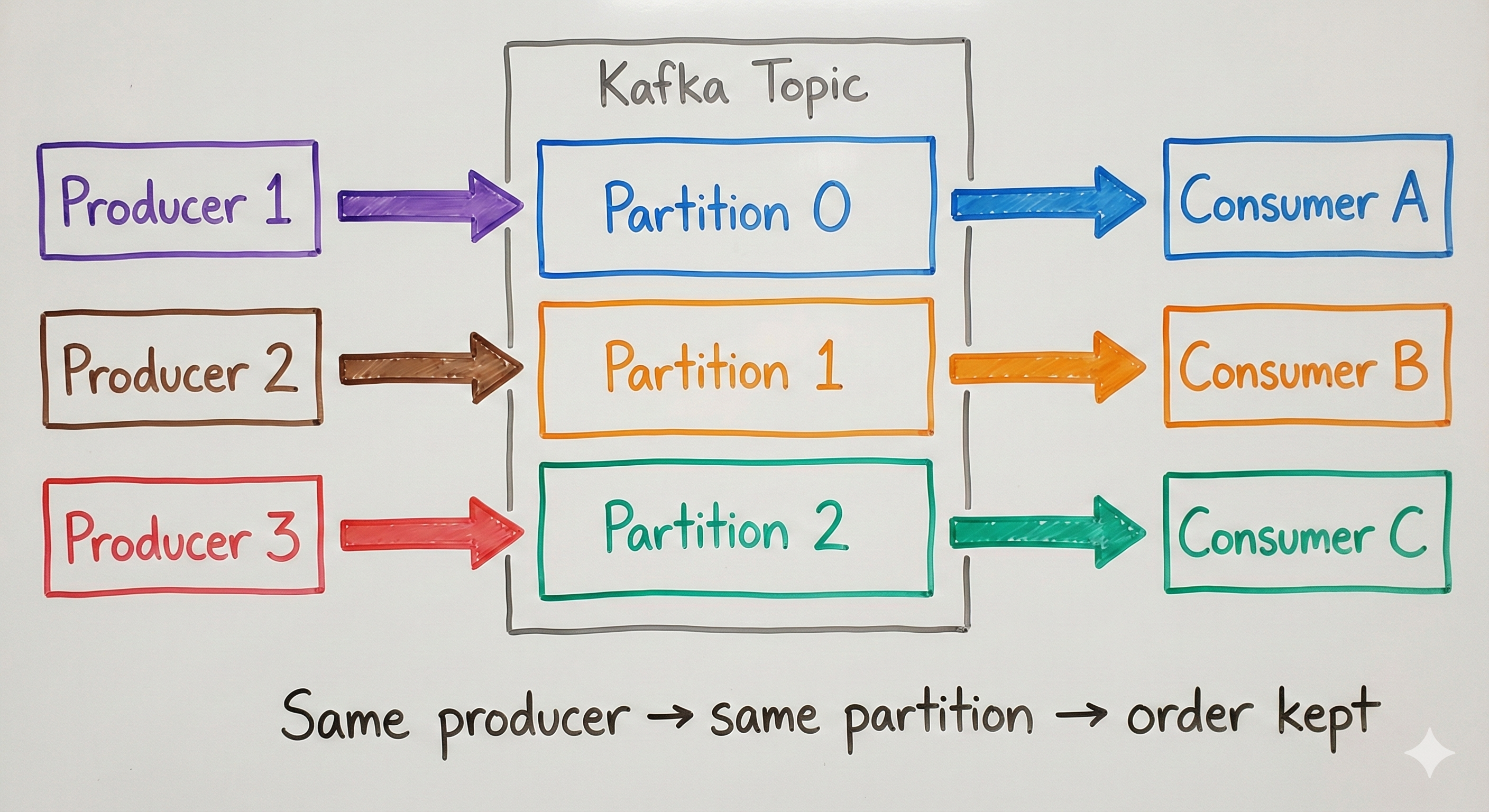
Idea: You have a fixed set of producers (e.g. Producer 1, 2, 3). Assign each producer to a dedicated partition: Producer 1 → Partition 0, Producer 2 → Partition 1, Producer 3 → Partition 2. Each producer explicitly sends to its partition so all its messages are ordered.
Why it works: All messages from Producer 1 go to Partition 0 → same partition → same order as produced. You get per-producer ordering and still get parallelism (one consumer per partition).
| Component | Count / role |
|---|---|
| Producers | 3 (Producer 1, 2, 3) |
| Partitions | 3 (aligned with producers) |
| Consumers | 3 (one per partition) |
Each producer must set the partition number when sending. No round-robin or random assignment for these producers.
Strategy 2: Event/Entity Type → Partition
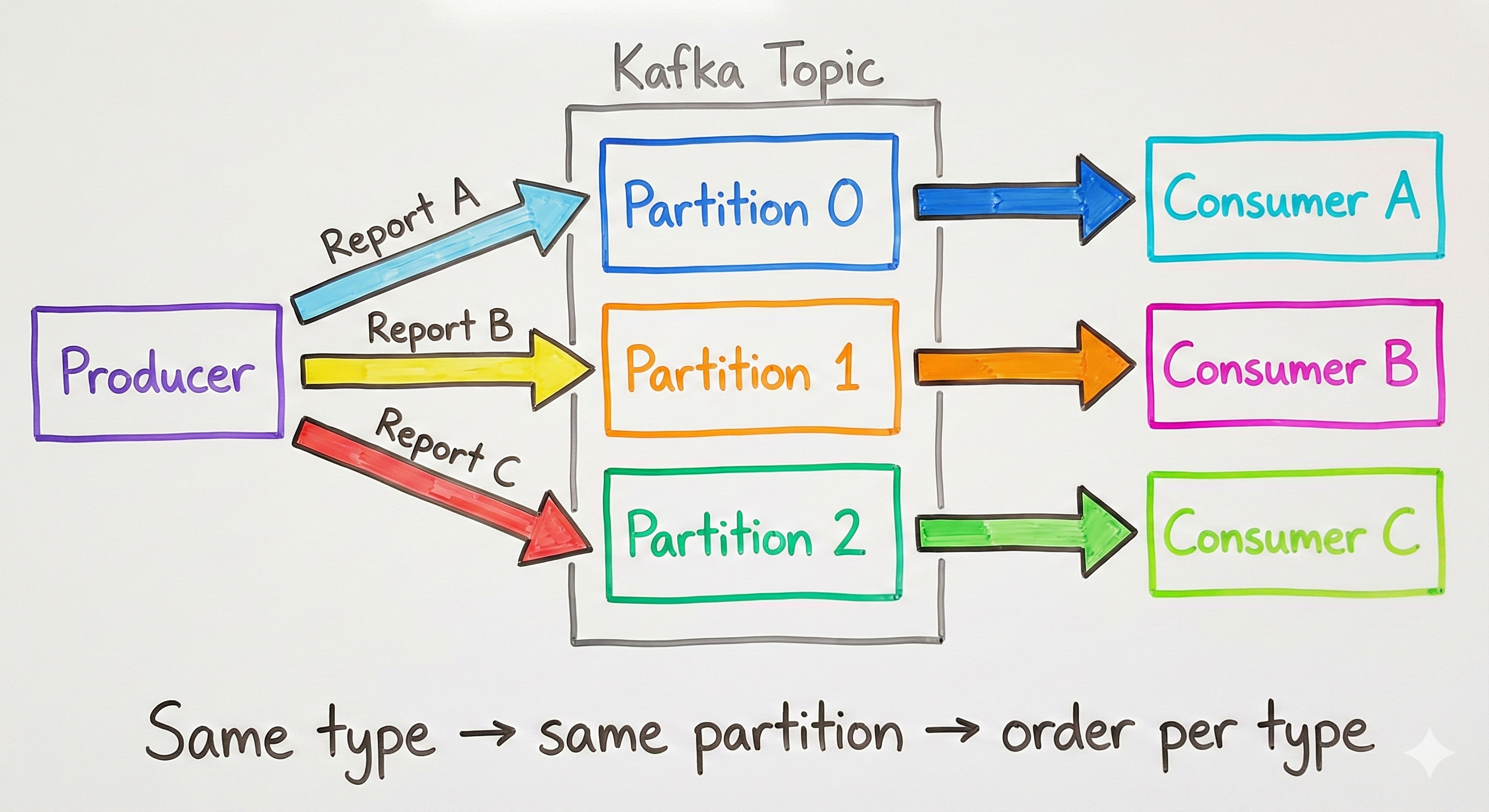
Idea: One producer, but many event or entity types (e.g. Report A, B, C). You need ordering per type (e.g. all "Report A" events in order), not across all events. Map each type to a fixed partition: Report A → Partition 0, Report B → Partition 1, Report C → Partition 2. Every message of that type goes to the same partition, so order is preserved per type.
Example: A system generates multiple report types at once. Report A → Partition 0, Report B → Partition 1, Report C → Partition 2. All Report A events go to partition 0 (ordered); same for B and C. You get per-report-type ordering and parallel consumption.
When to use: One producer, many logical streams (report types, entity types, tenants). Order matters within each stream, not across all streams. You scale by adding partitions (and consumers) per stream or group of streams.
How Kafka (and KafkaJS) Choose a Partition
The examples below use KafkaJS. Partition selection works like this: If partition is set on the message → that partition is used. Else if key is present → partition is chosen by hash of the key (e.g. murmur2). Else → round-robin (or default partitioner). So you can enforce ordering by setting partition or by using a stable key (e.g. producer id or report type) so the same key always maps to the same partition.
Code Examples (KafkaJS)
Install KafkaJS:
bash
npm install kafkajs
# or: yarn add kafkajs
Client and Producer Setup
javascript
const { Kafka } = require('kafkajs')

const kafka = new Kafka({
  clientId: 'my-app',
  brokers: ['kafka1:9092', 'kafka2:9092'],
})

const producer = kafka.producer()
await producer.connect()
1: Explicit Partition (Producer-per-Partition)
Each producer instance sends to its assigned partition:
javascript
// Producer 1 → partition 0, Producer 2 → partition 1, Producer 3 → partition 2
const PRODUCER_PARTITION = 0 // e.g. from config: 0, 1, or 2

await producer.send({
  topic: 'reports-topic',
  messages: [
    {
      value: JSON.stringify({ reportId: 'r1', data: '...' }),
      partition: PRODUCER_PARTITION, // explicit partition
    },
  ],
})
2: Key-Based Partitioning (Event/Report Type)
Use a key (e.g. report type) so all messages of that type go to the same partition:
javascript
const REPORT_TYPE_PARTITION = {
  'REPORT_A': 0,
  'REPORT_B': 1,
  'REPORT_C': 2,
}

function getPartitionForReportType(reportType) {
  return REPORT_TYPE_PARTITION[reportType] ?? 0
}

await producer.send({
  topic: 'reports-topic',
  messages: [
    {
      key: reportType, // e.g. 'REPORT_A' → same partition every time
      value: JSON.stringify({ reportId: 'r1', reportType, data: '...' }),
      partition: getPartitionForReportType(reportType), // optional if key is set
    },
  ],
})
Using key alone (without explicit partition) is enough for ordering per key: the default partitioner uses a hash of the key. Explicit partition is optional if your key space matches your partition count.
Consumer (Unchanged)
Ordering is preserved per partition; the consumer just reads from the topic and its assigned partitions:
javascript
const consumer = kafka.consumer({ groupId: 'reports-consumer-group' })

await consumer.connect()
await consumer.subscribe({ topic: 'reports-topic', fromBeginning: true })

await consumer.run({
  eachMessage: async ({ topic, partition, message }) => {
    console.log({
      partition,
      key: message.key?.toString(),
      value: message.value.toString(),
    })
  },
})
Optional: Custom Partitioner
For full control in one place (e.g. map report type to partition), use a custom partitioner:
javascript
const createReportPartitioner = () => {
  return ({ topic, partitionMetadata, message }) => {
    const key = message.key ? message.key.toString() : null
    const partitionMap = { REPORT_A: 0, REPORT_B: 1, REPORT_C: 2 }
    if (key && partitionMap[key] !== undefined) {
      return partitionMap[key]
    }
    return 0
  }
}

const producer = kafka.producer({ createPartitioner: createReportPartitioner })
Quick Reference
| Approach | Use when | Ordering guarantee | Scalability |
|---|---|---|---|
| Single partition | Low throughput; global order required | Full topic order | No parallelism |
| Producer-per-partition | Fixed producers; order per producer | Per-producer order | Yes (one partition per producer) |
| Event/type → partition | Single producer; multiple types; order per type | Per-type order | Yes (partitions per type/key) |
Takeaways: Ordering in Kafka is partition-local. Route all messages that must be ordered to the same partition (via explicit partition or stable key). Strategy 1: Multiple producers → assign each a partition and set partition when sending. Strategy 2: Multiple event/report types → use a stable key (e.g. report type) or explicit partition so each type always hits the same partition. Partition count: Align with the number of independent ordered streams (producers or types); run the same number of consumers in the group for balanced processing.
Conclusion
Kafka's strength is scalability and parallelism; its ordering guarantee is per partition, not per topic. If you need order across messages, you have to design for it: either one partition (and give up scale) or multiple partitions with intentional routing so that order-critical messages share a partition. The two strategies—producer-per-partition and event/entity-type-to-partition—let you keep the ordering you need while keeping the benefits of multiple partitions and multiple consumers. Design partition assignment (and keys) up front, and you won't be surprised when message 5 shows up before message 1.