How we ship features, fix bugs, and handle production emergencies without stepping on each other's toes.
You've been there: a hotfix gets merged to the wrong branch. Two features collide in develop. Someone force-pushed and rewrote history. Production is on fire and nobody's sure which commit is actually live.
Here's a simple workflow: 3 branches, 4 environments, clear path to production.
A clear Git workflow isn't just documentation—it's the backbone of predictable releases. This article walks through a branching strategy that keeps only three main branches (develop, main, and short-lived feature/bugfix/hotfix branches) and maps them to four deployment environments (dev, qa, pre-prod, prod). You'll see the full flow from feature start to production, when to use fetch vs. pull, and how to handle hotfixes without leaving develop and main out of sync.
Why This Workflow Exists
Teams that "just use Git" often end up with a mess: ad-hoc branch names, unclear promotion paths, and production deployments that don't match any single branch. The approach here is deliberately simple:
- ·Three conceptual pillars: develop (integration), main (production), and temporary branches for work.
- ·Environments are not branches: dev, qa, pre-prod, and prod are deployment targets. Code is deployed from branches to these environments; branches are not named after environments.
- ·Strict gates: Nothing lands on develop without a Pull Request (PR). Nothing lands on main without a Merge Request (MR). No direct merges to main—ever.
This keeps a single source of truth for "what's in production" (main) and "what's next" (develop), while still letting multiple developers and QA cycles run in parallel.
Unstructured Git and Deployment Drift
Without a defined workflow, teams run into:
- ·Deployment drift: Dev or QA runs from random branches; nobody can say exactly what's deployed where.
- ·Merge chaos: Feature branches merge into each other or into main by accident; history is full of merge commits and duplicate fixes.
- ·Hotfix confusion: A production fix is applied on a branch off develop, then never cleanly merged back to main, or vice versa—so the next release either loses the fix or doubles it.
A workflow fixes this by answering, for every change: Which branch does it start from? Which branch does it merge into? Which environment does it deploy to?
Branches and Environments
The Three Branch Types (Plus Short-Lived Work Branches)
We keep three main branch concepts and use short-lived branches for all actual work:
| Branch | Purpose | Description |
|---|---|---|
| develop | Main development branch | Holds all approved, tested work. All code flows through develop before production. |
| main | Production branch | What end-users run. Only stable code from develop (or hotfixes) gets here—only via Merge Request (MR). |
| feature | Feature work | Short-lived branches from develop. Format: feature/<feature-name> or feature/<ticket>-<name>. |
| bugfix | Bug fixes | Short-lived branches from develop for issues found in testing. Format: bugfix/<bugfix-name>. |
| hotfix | Production emergencies | Short-lived branches from main (not develop). Format: hotfix/<hotfix-name>. |
Hotfix branches are created from main because they fix the production codebase. Feature and bugfix branches are created from develop because they extend the integration line.
Deployment Environments (Not Branches)
Environments are where code runs. Branches are what gets deployed there:
| Environment | Purpose | Deployed from |
|---|---|---|
| dev | Developer testing | Feature / bugfix |
| qa | QA testing | Feature / bugfix |
| pre-prod | Staging, demos, final sign-off | develop |
| prod | Live users | main |
Full workflow at a glance:
text
develop
  ├── feature/user-auth → [Deploy] dev → qa → [PR, Squash] develop
  ├── bugfix/login-error → [Deploy] dev → qa → [PR, Squash] develop
  ├── [Deploy] pre-prod
  └── [MR only] main → [Deploy] prod

main
  └── hotfix/critical-fix → [MR] develop (test in dev/qa) → [MR] main → [Deploy] prod → [Sync] develop
Branch and Tag Formats
Consistent names make automation and code review easier.
- ·Feature:
feature/<feature-name>orfeature/<ticket>-<name>Examples:feature/user-authentication,feature/JIRA-123-add-payment-gateway - ·Sub-feature (multiple devs on one feature):
sub-feature/<feature-name>-<developer-name>Examples:sub-feature/user-auth-john-doe,sub-feature/user-auth-jd - ·Bugfix:
bugfix/<bugfix-name>orbugfix/<ticket>-<name>Examples:bugfix/login-error-fix,bugfix/JIRA-789-ui-bug - ·Hotfix:
hotfix/<hotfix-name>orhotfix/<ticket>-<name>Examples:hotfix/critical-bug-fix,hotfix/JIRA-456-security-patch - ·Release tags:
v<major>.<minor>.<patch>Examples:v1.0.0,v2.1.3
The Day-to-Day Workflows
Feature Workflow (Start to Develop)
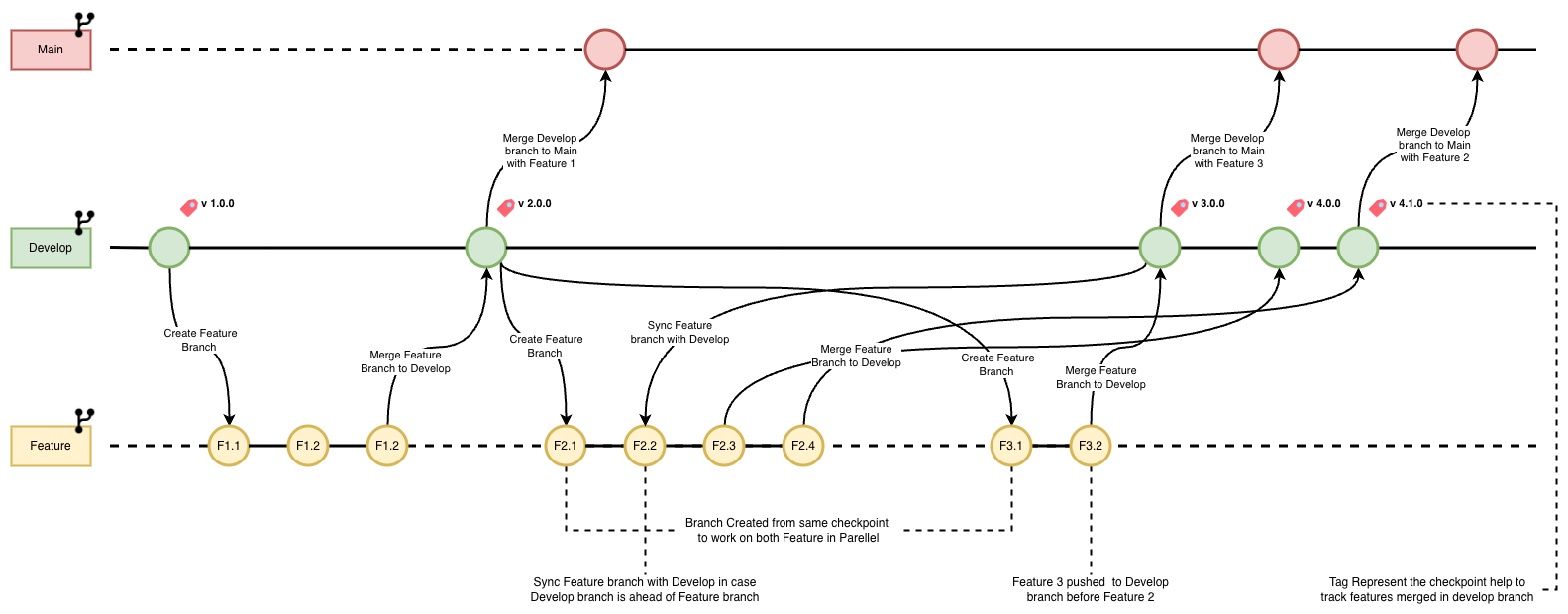
Step 1 — Create the feature branch from develop:
bash
git checkout develop
git pull origin develop
git checkout -b feature/<feature-name>
git push -u origin feature/<feature-name>
Step 2 — Multiple developers on the same feature: Use sub-branches off the feature branch, then merge back into the feature (normal merge to keep history):
bash
git checkout feature/<feature-name>
git pull origin feature/<feature-name>
git checkout -b sub-feature/<feature-name>-<developer-name>
# ... work, commit, push ...
# When done:
git checkout feature/<feature-name>
git merge sub-feature/<feature-name>-<developer-name>
git push origin feature/<feature-name>
Step 3 — Sync feature with develop before deploy or PR: Use fetch + rebase so you don't create merge commits and keep a linear history:
bash
git checkout feature/<feature-name>
git fetch origin develop
git rebase origin/develop
git push origin feature/<feature-name> --force-with-lease
Why fetch instead of pull? git pull = fetch + merge (adds a merge commit). For rebasing, you only want the latest commits from develop without merging. So: fetch, then rebase. No merge commit, clean replay of your commits on top of develop.
If rebase hits conflicts: Resolve in the files, then:
bash
git add <file>
git rebase --continue
Step 4–5 — Deploy to dev, then qa: Deploy the feature branch to dev and qa via your CI/CD pipeline. No merge to develop is required for deployment.
Step 6 — Merge into develop (after QA approval): Only via Pull Request, with Team Lead + Stakeholder approval. Use squash merge so each feature is one commit on develop. Then optionally delete the feature branch.
Step 7 — Release tag (optional but useful): After merging to develop:
bash
git checkout develop
git pull origin develop
git tag -a v<major>.<minor>.<patch> -m "Release v<major>.<minor>.<patch>: <description>"
git push origin v<major>.<minor>.<patch>
Tags give you rollback points and a clear deployment reference.
Bugfix Workflow (Issue Found After Feature Merge)
When a bug is found in testing after a feature is already on develop, fix it on a bugfix branch from develop:
Create and work on the bugfix branch:
bash
git checkout develop
git pull origin develop
git checkout -b bugfix/<bugfix-name>
git push -u origin bugfix/<bugfix-name>
# ... fix, commit ...
git add .
git commit -m "Fix: <description of bug fix>"
git push origin bugfix/<bugfix-name>
Sync with develop (same as feature):
bash
git checkout bugfix/<bugfix-name>
git fetch origin develop
git rebase origin/develop
git push origin bugfix/<bugfix-name> --force-with-lease
Deploy the bugfix branch to dev and qa, then merge to develop via PR with squash merge and required approvals. Delete the bugfix branch after merge.
From Develop to Production (Pre-prod → Main → Prod)
Step 8 — Pre-prod: Deploy the develop branch to pre-prod. Use it for final validation and stakeholder sign-off.
Step 9 — Merge to main (production): Only via Merge Request (MR) in the GitHub/GitLab UI. No direct or command-line merge to main.
- ·Create MR: source develop, target main.
- ·Get Team Lead + Stakeholder approval.
- ·Use normal merge (not squash) so production history is preserved.
- ·After merge, deploy main to prod via CI/CD.
Merging to main is the only path to production. Keeping it MR-only ensures an audit trail and prevents accidental overwrites.
Hotfix Workflow (Production Emergency)
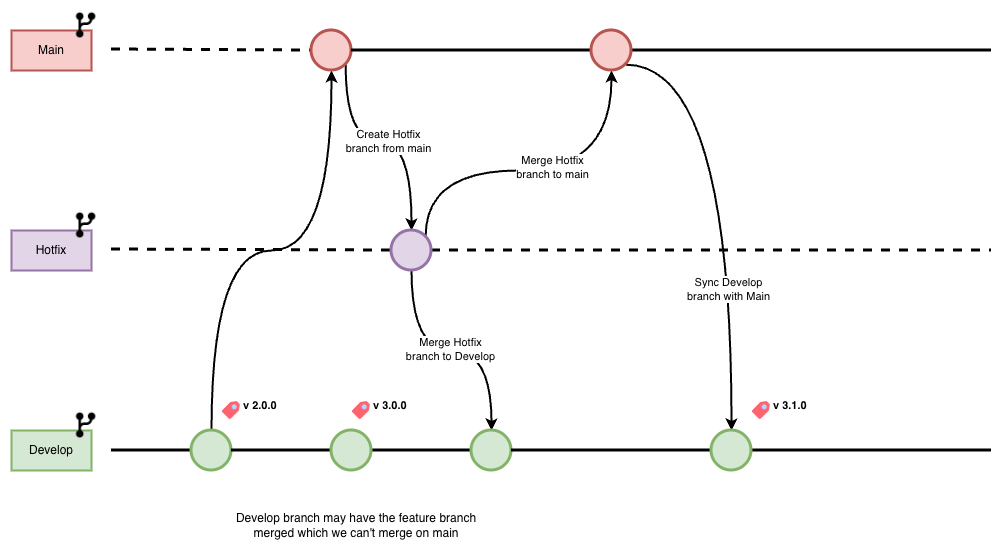
When production has a critical bug and develop has features that aren't ready to release, fix production from main and then bring that fix back into develop.
Step 1 — Create hotfix from main:
bash
git checkout main
git pull origin main
git checkout -b hotfix/<hotfix-name>
git push -u origin hotfix/<hotfix-name>
Step 2 — Implement fix, commit, push.
Step 3 — Merge hotfix → develop (via MR): So the fix is tested in dev/qa along with the rest of develop. Use squash or normal merge per your policy.
Step 4–5 — Deploy develop to dev and qa and validate the hotfix there.
Step 6 — Merge hotfix → main (via MR only): Same as normal release: MR from hotfix to main, approvals, normal merge in UI. Then deploy main to prod.
Step 7 — Sync develop with main: Because the hotfix was created from main, main may have commits that develop doesn't have. Bring them over:
bash
git checkout develop
git pull origin develop
git fetch origin main
git merge origin/main
git push origin develop
Then delete the hotfix branch (local and remote).
Quick Reference
Feature: create, sync, and merge
bash
# Create and push feature branch
git checkout develop
git pull origin develop
git checkout -b feature/<feature-name>
git push -u origin feature/<feature-name>

# Sync with develop (fetch + rebase)
git checkout feature/<feature-name>
git fetch origin develop
git rebase origin/develop
git push origin feature/<feature-name> --force-with-lease
Bugfix: create and sync
bash
git checkout develop
git pull origin develop
git checkout -b bugfix/<bugfix-name>
git push -u origin bugfix/<bugfix-name>

git add .
git commit -m "Fix: <description of bug fix>"
git push origin bugfix/<bugfix-name>

# Sync with develop
git checkout bugfix/<bugfix-name>
git fetch origin develop
git rebase origin/develop
git push origin bugfix/<bugfix-name> --force-with-lease
Hotfix: create, merge to develop and main, then sync
bash
# Create from main
git checkout main
git pull origin main
git checkout -b hotfix/<hotfix-name>
git push -u origin hotfix/<hotfix-name>

# After MR to develop and MR to main, and deploy:
# Sync develop with main
git checkout develop
git pull origin develop
git fetch origin main
git merge origin/main
git push origin develop

# Delete hotfix branch
git branch -d hotfix/<hotfix-name>
git push origin --delete hotfix/<hotfix-name>
Fetch vs pull when syncing
| Command | Effect | When to use |
|---|---|---|
| git fetch origin develop | Downloads latest from develop, no merge | Before rebase (preferred) |
| git pull origin develop | Fetches and merges into current branch | When you want a merge |
Wrong (pull then rebase): Merge commit appears, then rebase becomes messy. Right: git fetch origin develop then git rebase origin/develop for a clean linear history. After rebase, use git push --force-with-lease so you don't overwrite remote changes by mistake.
Merge and Deployment Summary
| Merge / flow | Method | Approval |
|---|---|---|
| Feature → develop | Squash merge (PR) | Team Lead + Stakeholder |
| Bugfix → develop | Squash merge (PR) | Team Lead + Stakeholder |
| develop → main | Normal merge (MR only) | Team Lead + Stakeholder |
| Hotfix → develop | Squash or normal (MR) | Team Lead + Stakeholder |
| Hotfix → main | Normal merge (MR only) | Team Lead + Stakeholder |
| main → develop (sync) | Normal merge | As needed / MR |
| Deployment | Source branch | Target env |
|---|---|---|
| Feature/bugfix | Feature/bugfix branch | dev, qa |
| Staging | develop | pre-prod |
| Production | main | prod |
Lessons Learned and Best Practices
- ·Branch hygiene: Create features and bugfixes from latest develop; create hotfixes from main. Keep short-lived branches in sync via fetch + rebase. Delete branches after merge.
- ·Sync before deploy and before PR: Always rebase feature/bugfix on develop before deploying to dev/qa and before opening a PR. Reduces merge conflicts and keeps history clean.
- ·Never merge to main outside an MR: All production changes go through an MR (from develop or from a hotfix). No direct or CLI merge to main.
- ·Use --force-with-lease after rebase: Safer than --force; avoids overwriting remote work.
- ·Tags and releases: Tag develop after merges (e.g. v1.0.0) for rollback and release tracking.
- ·Collaboration: Coordinate who deploys to dev/qa/pre-prod; get QA sign-off before merging to develop; get stakeholder sign-off in pre-prod before MR to main. After a hotfix to main, always sync develop with main.
Troubleshooting
- ·Rebase conflicts: Resolve in the files, git add, then git rebase --continue. Sync with develop often to reduce conflict size.
- ·Feature/bugfix out of sync: Use git fetch origin develop and git rebase origin/develop. Avoid git pull origin develop right before a rebase.
- ·Accidental pull before rebase: If you already pulled (and got a merge commit), you can reset that merge (e.g. git reset --hard HEAD~1 if it's the last commit) and then do fetch + rebase, or create a new branch from latest develop and cherry-pick your commits.
Conclusion
A simple, strict Git workflow—three main branches, four environments, PRs for develop, MRs only for main—gives teams a clear path from feature to production and from hotfix back into the mainline. Using fetch + rebase for syncing keeps history linear; using squash into develop and normal merge into main keeps integration clean and production auditable. Once this is in place, "what's in prod?" and "how do I get my fix live?" have one clear answer.